

If you’ve been publishing content on your WordPress site but your traffic still isn’t growing, then the missing piece often isn’t more content. It’s backlinks.
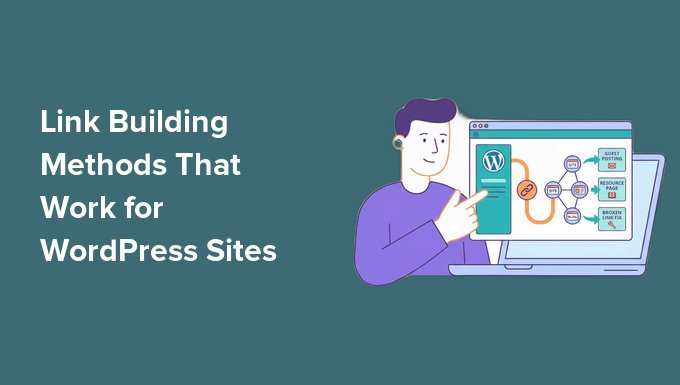
Link building is the process of getting other websites to link to your content. These links help search engines see your site as trustworthy and valuable, which can improve your rankings.
That’s why some smaller websites can outrank bigger competitors. They often have stronger backlinks pointing to their content.
The good news is that link building isn’t just for SEO experts or large companies. There are simple strategies that work well for WordPress users, even if you’re just getting started.
In this guide, I’ll show you 9 proven link building methods that actually work for WordPress sites. These tips are beginner-friendly, practical, and easy to start using right away.
💡Quick Answer: Best Link Building Methods for WordPress
Here are the quickest wins out of the 9 link building methods covered in this guide:
- Internal Linking (The Easiest SEO Win): Improve links between your own posts and pages to quickly boost SEO and help search engines understand your site structure.
- Broken Link Building (Best for Beginners): Find broken links on other websites and suggest your content as a replacement. This is a simple way to earn relevant backlinks.
- Guest Posting (Best for High-Quality Backlinks): Write helpful articles for other blogs in your niche and include a link back to your site. This builds authority and steady backlinks over time.
What Is Link Building?
Link building is the practice of getting other websites to link to content on your site. These links from other websites are called backlinks.
In simple terms, link building is about getting other sites to “vouch” for your content.
Think of it like recommendations.
If someone recommends a product or service to you, you’re more likely to trust it. Search engines work the same way. When another website links to your content, it acts like a vote of confidence.
One term you’ll come across a lot is referring domains. Backlinks count every individual link pointing to your site, while referring domains count how many different websites link to you.
That difference matters: ten links from ten separate sites usually signal more trust than ten links from the same site. So as you build links, try to earn them from a range of relevant websites, not just a handful of the same sources.
Why Link Building Matters for Your WordPress Site
Link building is important because most pages don’t naturally attract backlinks. And without backlinks, it’s very hard to rank in search results.
I’ve personally seen WordPress sites struggle to grow simply because they didn’t have enough quality links pointing to their content.
Even well-written articles can stay buried in search results without them.
But when you build links the right way, your content has a much better chance of:
- Ranking Higher in Google Search Results: Pages with more quality backlinks tend to perform better in rankings.
- Getting Consistent Organic Traffic: Strong backlinks help bring in steady, free traffic over time.
- Standing Out in Search Results: Better link profiles contribute to your site’s overall authority. This helps your pages compete for higher rankings, even against larger and more established websites.
Unlike social media traffic, which fades quickly, backlinks keep working for you in the background. That’s why even small improvements in link building can make a big difference for your website.
Before You Start Link Building (3 Quick Checks)
Before you jump into link building, I recommend making sure your site is fully ready first.
I’ve seen a lot of beginners try different link building methods too early, but don’t get results. The issue usually isn’t the strategy. It’s the foundation.
If your content or SEO setup isn’t strong enough yet, other websites simply won’t feel confident linking to you. So before we get into tactics, run through these three quick checks.
Make Sure You Have Link-Worthy Content
No one links to thin or low-value content. If your article doesn’t actually help the reader, then it’s very unlikely someone will reference it or share it.
To attract backlinks, your content should feel complete and useful. At a minimum, I recommend:
- 800–1500+ words per post
- Clear structure with headings and short paragraphs
- Practical steps, examples, or real solutions
Think about it this way: websites don’t link to pages just because they exist. They link to pages that solve a problem better than others.
If your content answers a question in a simple and complete way, you already have a much better chance of earning links.
To get started, I suggest checking out our tutorial on writing a great blog post.
Set Up Basic SEO
Before building links, you also need to make sure search engines can properly understand and index your content. That’s where a plugin like All in One SEO comes in.
It’s the best SEO plugin for WordPress that we personally use at WPBeginner. To learn more about our experience, please take a look at our AIOSEO review.
Instead of worrying about complex settings, AIOSEO helps you handle the basics, such as:
- Writing SEO-friendly titles and meta descriptions
- Improving how your posts appear in Google search results
- Setting proper indexing rules so search engines can crawl your site correctly
- Adding structured data to help your content stand out
Without these basics in place, even strong backlinks may not deliver their full impact. Search engines still need to understand what your pages are about.
👉 To get started, I recommend these guides:
How to Check If Your WordPress SEO Is Actually Working
How to Install and Set Up All in One SEO for WordPress
Ultimate WordPress SEO Guide for Beginners
Publish at Least 5–10 Solid Posts
You don’t need a huge blog to start link building. But you do need enough quality content worth linking to.
If your site only has one or two posts, most link building efforts won’t go very far. There simply isn’t enough content to promote or reference.
That’s why I recommend publishing at least 5–10 good-quality posts first.
Focus on evergreen content. These are posts that stay useful for a long time, not just short-term trends.
This can include:
- Beginner guides
- Step-by-step tutorials
- “How to” articles that solve specific problems
- Resource-style posts people can reference later
Once you have this foundation, everything in link building becomes easier. You’ll have more pages that are actually worth sharing, pitching, and linking to.
Frequently Asked Questions About Link Building
Here are quick answers to the most common questions people have about link building.
How many backlinks do I need for SEO?
There is no fixed number of backlinks you need. What matters more is quality and relevance. A few strong backlinks from trusted sites can often outperform hundreds of low-quality ones.
How long does link building take to show results?
Link building usually takes time to show results, often a few weeks to a few months. Search engines need time to discover new links and adjust rankings based on your site’s overall authority.
Are paid backlinks safe for SEO?
Paid backlinks are risky and can hurt your SEO if they are used to manipulate rankings. Google’s guidelines discourage buying links for ranking purposes.
In some cases, they may lead to penalties or reduced visibility. It’s always safer to focus on earning natural, editorial backlinks instead.
What is a nofollow backlink?
A nofollow backlink is a link that tells search engines not to pass SEO authority to the linked page. These links can still bring traffic and visibility, but they usually don’t directly improve rankings.
Can I do link building for free?
Yes, you can do link building for free using methods like guest posting, broken link building, resource page outreach, and internal linking. These strategies require time and effort instead of money.
How to check backlinks to my website?
You can check backlinks using tools like Google Search Console or Semrush. These tools show which websites are linking to your content and help you track your overall backlink profile.
Is a sponsored post the same as a paid backlink?
No, they are not the same, and the difference matters for SEO.
A sponsored post is paid advertising where your content or brand is featured on another website. Any links in these posts should use a “sponsored” or “nofollow” tag, which tells search engines not to pass SEO authority.
This is a safe and accepted practice when properly disclosed.
A paid backlink is when you pay for a regular “dofollow” link to be added just to improve rankings. This violates Google’s guidelines and can lead to penalties.
Does link building help you show up in AI search?
It does, but not as a separate tactic. Tools like Google’s AI Overviews, ChatGPT, and Perplexity tend to cite sources they consider trustworthy, and the authority you build through quality backlinks is a big part of earning that trust.
Google has confirmed there is no special optimization for AI Overviews. The same SEO fundamentals apply, and a page simply needs to be indexed and eligible to appear in search.
So the best way to get cited in AI search is the same as everything else in this guide: earn relevant, trustworthy links and publish clear, genuinely helpful content.
Final Thoughts on Link Building
For quick wins, start with internal linking and broken link building. These don’t depend on anyone else saying yes, so you can act on them today.
For lasting results, work on guest posting, building real relationships, and creating linkable assets. These take longer, but the links they earn tend to stick.
My advice is to pick one or two and stay consistent. Steady effort beats a big push that you drop after a week.
I hope this article helped you learn some link building strategies to grow your site. You may also want to see our expert insights on whether SEO still works and our list of the best AI SEO tools for WordPress.
If you liked this article, then please subscribe to our YouTube Channel for WordPress video tutorials. You can also find us on Twitter and Facebook.


Discussion
Have a question about this guide?
Share your question, issue, or improvement idea. Keep it specific so the reply can be useful for other WordPress users too.