

If you’ve been publishing content on your WordPress site but your traffic still isn’t growing, then the missing piece often isn’t more content. It’s backlinks.
Link building is the process of getting other websites to link to your content. These links help search engines see your site as trustworthy and valuable, which can improve your rankings.
That’s why some smaller websites can outrank bigger competitors. They often have stronger backlinks pointing to their content.
The good news is that link building isn’t just for SEO experts or large companies. There are simple strategies that work well for WordPress users, even if you’re just getting started.
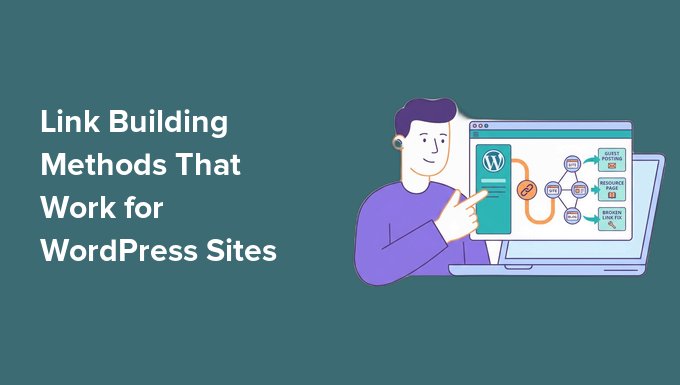
In this guide, I’ll show you 9 proven link building methods that actually work for WordPress sites. These tips are beginner-friendly, practical, and easy to start using right away.
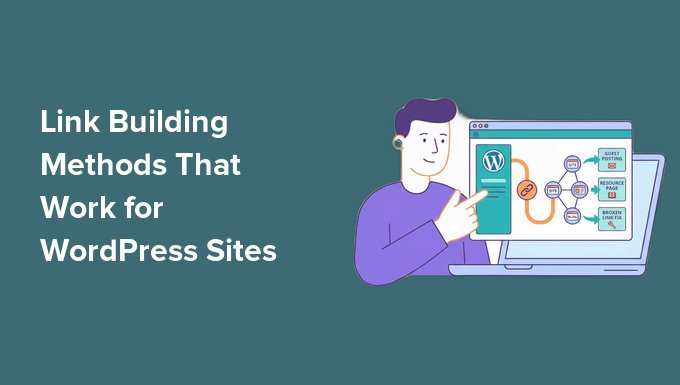
💡Quick Answer: Best Link Building Methods for WordPress
Here are the quickest wins out of the 9 link building methods covered in this guide:
- Internal Linking (The Easiest SEO Win): Improve links between your own posts and pages to quickly boost SEO and help search engines understand your site structure.
- Broken Link Building (Best for Beginners): Find broken links on other websites and suggest your content as a replacement. This is a simple way to earn relevant backlinks.
- Guest Posting (Best for High-Quality Backlinks): Write helpful articles for other blogs in your niche and include a link back to your site. This builds authority and steady backlinks over time.
What Is Link Building?
Link building is the practice of getting other websites to link to content on your site. These links from other websites are called backlinks.
In simple terms, link building is about getting other sites to “vouch” for your content.
Think of it like recommendations.
If someone recommends a product or service to you, you’re more likely to trust it. Search engines work the same way. When another website links to your content, it acts like a vote of confidence.
One term you’ll come across a lot is referring domains. Backlinks count every individual link pointing to your site, while referring domains count how many different websites link to you.
That difference matters: ten links from ten separate sites usually signal more trust than ten links from the same site. So as you build links, try to earn them from a range of relevant websites, not just a handful of the same sources.
Why Link Building Matters for Your WordPress Site
Link building is important because most pages don’t naturally attract backlinks. And without backlinks, it’s very hard to rank in search results.
I’ve personally seen WordPress sites struggle to grow simply because they didn’t have enough quality links pointing to their content.
Even well-written articles can stay buried in search results without them.
But when you build links the right way, your content has a much better chance of:
- Ranking Higher in Google Search Results: Pages with more quality backlinks tend to perform better in rankings.
- Getting Consistent Organic Traffic: Strong backlinks help bring in steady, free traffic over time.
- Standing Out in Search Results: Better link profiles contribute to your site’s overall authority. This helps your pages compete for higher rankings, even against larger and more established websites.
Unlike social media traffic, which fades quickly, backlinks keep working for you in the background. That’s why even small improvements in link building can make a big difference for your website.
Before You Start Link Building (3 Quick Checks)
Before you jump into link building, I recommend making sure your site is fully ready first.
I’ve seen a lot of beginners try different link building methods too early, but don’t get results. The issue usually isn’t the strategy. It’s the foundation.
If your content or SEO setup isn’t strong enough yet, other websites simply won’t feel confident linking to you. So before we get into tactics, run through these three quick checks.
Make Sure You Have Link-Worthy Content
No one links to thin or low-value content. If your article doesn’t actually help the reader, then it’s very unlikely someone will reference it or share it.
To attract backlinks, your content should feel complete and useful. At a minimum, I recommend:
- 800–1500+ words per post
- Clear structure with headings and short paragraphs
- Practical steps, examples, or real solutions
Think about it this way: websites don’t link to pages just because they exist. They link to pages that solve a problem better than others.
If your content answers a question in a simple and complete way, you already have a much better chance of earning links.
To get started, I suggest checking out our tutorial on writing a great blog post.
Set Up Basic SEO
Before building links, you also need to make sure search engines can properly understand and index your content. That’s where a plugin like All in One SEO comes in.
It’s the best SEO plugin for WordPress that we personally use at WPBeginner. To learn more about our experience, please take a look at our AIOSEO review.
Instead of worrying about complex settings, AIOSEO helps you handle the basics, such as:
- Writing SEO-friendly titles and meta descriptions
- Improving how your posts appear in Google search results
- Setting proper indexing rules so search engines can crawl your site correctly
- Adding structured data to help your content stand out
Without these basics in place, even strong backlinks may not deliver their full impact. Search engines still need to understand what your pages are about.
👉 To get started, I recommend these guides:
How to Check If Your WordPress SEO Is Actually Working
How to Install and Set Up All in One SEO for WordPress
Ultimate WordPress SEO Guide for Beginners
Publish at Least 5–10 Solid Posts
You don’t need a huge blog to start link building. But you do need enough quality content worth linking to.
If your site only has one or two posts, most link building efforts won’t go very far. There simply isn’t enough content to promote or reference.
That’s why I recommend publishing at least 5–10 good-quality posts first.
Focus on evergreen content. These are posts that stay useful for a long time, not just short-term trends.
This can include:
- Beginner guides
- Step-by-step tutorials
- “How to” articles that solve specific problems
- Resource-style posts people can reference later
Once you have this foundation, everything in link building becomes easier. You’ll have more pages that are actually worth sharing, pitching, and linking to.
How to Tell If a Backlink Is Worth Pursuing
Before you spend time on any of the methods below, it helps to know what a good backlink actually looks like. Not every link is worth chasing, and a few strong ones beat a long list of weak ones.
I use the same quick checklist no matter which method I am using.
Here is what I look at before reaching out to any site:
- Relevance to Your Topic (Most Important): A link from a site in your niche carries far more weight than a link from an unrelated one. For example, a small gardening blog linking to your gardening post is better than a big tech site that has nothing to do with you.
- The Site’s Own Quality and Traffic: Look for a site that publishes regularly, gets real readers, and looks trustworthy. You can also check its domain authority, which is a third-party score that estimates how strong a site is in search results.
- Where the Link Sits on the Page: A link placed inside the actual content is much more valuable than one buried in a footer, sidebar, or a long list of unrelated links. Editorial links inside an article signal a genuine recommendation.
- Follow vs. Nofollow: A normal “follow” link passes SEO value to your site, while a “nofollow” link tells search engines not to pass that value. Nofollow links are still worth having for traffic and visibility, so a natural mix of both is healthy.
If a link checks the relevance and placement boxes, it is usually worth pursuing, even if the site is small.
In my experience, one relevant link from a site your readers actually trust does more for your rankings than a handful of random links from sites that have nothing to do with your topic.
The 9 Best Link Building Methods for Your WordPress Site
Now that your site is set up and ready, it’s time to start building links.
In this section, I’m going to walk you through 9 proven link building methods that actually work.
You don’t need to try everything at once. In fact, it’s better to start with just one or two methods and stay consistent.
1. Guest Posting (Best for High-Quality Backlinks)
Guest posting is one of the most reliable ways to build strong backlinks to your WordPress site.
It simply means writing an article for another website in your niche and including a link back to your own site. That link is usually placed naturally inside the content or in the author bio.
What makes guest posting so effective is that you’re not just getting a random link. You’re getting featured on an established website that already has readers, authority, and trust in your niche.
This works especially well for newer WordPress sites that struggle to rank on their own. A single well-placed guest post can sometimes bring both traffic and long-term SEO value.
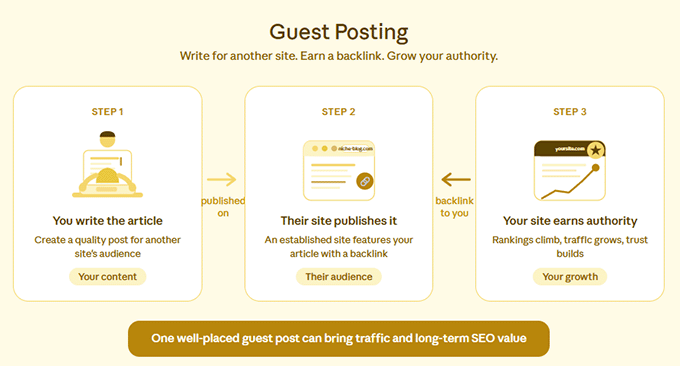
How the Guest Posting Process Works (Step-by-Step)
The process is simple, but it does require consistency.
You start by finding relevant websites in your niche. Then, you pitch them an idea.
If they accept it, you write a high-quality article for their audience. Once it’s published, you get a backlink to your site.
In most cases, you’ll place the link naturally within the article where it adds value for the reader. This means attaching the link to relevant words in a sentence (known as anchor text), rather than just pasting a raw URL.
I recommend focusing only on sites that are closely related to your topic. Overall, relevance matters more than authority alone. A smaller niche blog can often send better SEO signals than a large unrelated website.
How to Find Guest Posting Opportunities
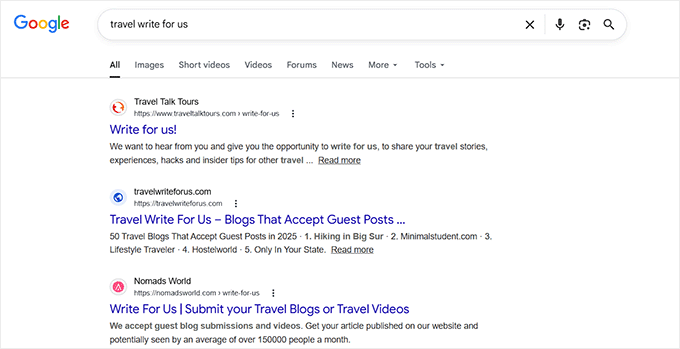
Most beginners assume guest posting is hard, but it usually starts with simple Google searches.
You can try searches like:
- “your niche + write for us”
- “your niche + guest post”
- “your niche + contribute”
- “your niche + submit an article”
For example, if you have a travel blog, then you might search for ‘Travel write for us’ or ‘travel guest post guidelines.’
Once you find potential sites, don’t rush into pitching right away.
Not every website is worth your time, and choosing the right ones can significantly improve your chances of getting accepted.
I personally recommend doing a quick quality check before you even write your email. Here’s what to look for:
| What to Check | Why It Matters |
|---|---|
| Website is active (recent posts) | Shows the site is still maintained and growing |
| Content is high quality | Better sites usually give better SEO value |
| Topics match your niche | Relevant backlinks carry more weight in SEO |
| Accepts guest posts | Saves time before you prepare your pitch |
If a site passes these simple checks, it’s usually worth reaching out and testing a pitch.
Writing a Guest Post Pitch That Gets Replies
This is the part where many beginners struggle, but it’s usually not because guest posting is difficult. It’s because the pitch feels too generic or too long.
Most site owners don’t read complicated emails. They skim. So your goal is simple: be clear, be personal, and get to the point quickly.
I recommend thinking of your email more like a short introduction, not a formal proposal. Here’s a simple structure that works well:
- Start with a Personal Reference: Mention something specific about their site. For example, a post you read or a topic you liked. This shows that you’re not sending mass emails.
- Introduce Your Idea Briefly: You don’t need to write the full article in the email. Just share 1–2 topic ideas so they can quickly understand your angle.
- End with a Simple, Open Close: Keep it natural and low pressure. You’re not pushing them. You’re just inviting a response.
- Keep Your Subject Line Short and Clear: Your subject line should be simple and easy to scan. Avoid anything clickbaity or overly long. A few examples that work well include ‘Guest post idea for your blog’, ‘Quick content idea for your audience’, ‘Contribution idea for your site.’
What Is Broken Link Building?
Broken link building means finding links on other websites that no longer work and offering your own content as a replacement.
A broken link usually leads to a page that has been deleted or moved, which results in a 404 error. These are common on older blog posts, resource pages, and tutorials.
Instead of letting that broken link stay on the site, you reach out to the website owner and suggest a better, working page from your own website.
How to Find Broken Links
Finding broken links becomes much easier when you use the right tools. One of the best options for this is Semrush. It is a powerful SEO tool that lets you analyze any website’s backlinks in detail.
For broken link building, the feature I rely on is Backlink Analytics. Instead of simply scanning a site for errors, it helps you find dead pages that other websites are still linking to, which is exactly what makes this strategy work.
To get started, enter a competitor or a relevant website in your niche into the Backlink Analytics tool and click ‘Analyze’. Semrush will pull up that site’s full backlink profile.
Next, open the Indexed Pages tab and tick the ‘Broken Pages’ box.
This filters the list down to pages on that site that return an error, like a 404. These are pages that have been moved or deleted, but may still have backlinks pointing to them.
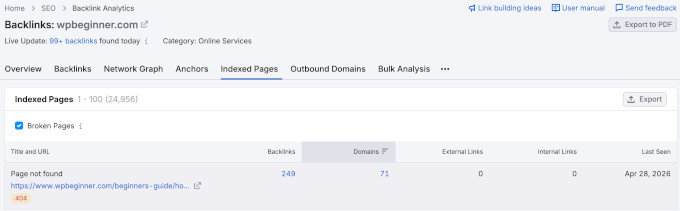
When you find a broken page, click the number in the Backlinks column. This shows you every website that is still linking to that dead page.
Those linking sites are your outreach targets. They are currently pointing to a page that no longer works, so they have a real reason to swap in a working replacement.
Before you reach out, I recommend visiting each broken page yourself to confirm it is actually dead. Sometimes a page is only temporarily unavailable rather than permanently broken.
This approach works especially well with competitor websites, resource pages, and older blog posts in your niche, since these naturally collect outdated links over time.
Once you find a broken link worth pursuing, make a note of the page it appears on and the topic it originally pointed to. This will help you create or choose a relevant replacement page later.
💡 Expert Tip: Before you start looking for opportunities on other websites, it’s also important to make sure your own site is clean. Broken links can hurt user experience and SEO, so fixing them first is always a good idea.
I recommend using the Broken Link Checker plugin by AIOSEO. It is a beginner-friendly tool that helps you find, manage, and fix broken links directly inside your WordPress dashboard.
For more information, see our tutorial on how to find and fix broken links in WordPress.
How to Reach Out to Website Owners
Once you find a broken link, the next step is outreach.
The key here is your approach. You should not sound like you are asking for a favor. Instead, you should sound like you are helping them improve their content.
I recommend keeping your email short, clear, and helpful.
Here’s a simple example you can use:
Hi [Name],
I was reading your article on [topic] and noticed that one of the links is no longer working.
The link pointing to [broken page] seems to return a 404 error.
I recently published a similar resource that might be a good replacement:
[Your URL]
Just thought I’d share in case it helps your readers.
Thanks,
[Your Name]
This method works better because you lead with value instead of asking for a backlink right away.
How to Create a Better Replacement Page
A replacement page is simply a page on your website that covers the same topic as the broken link, but in a better and more updated way.
Think of it like replacing outdated information with something more useful for today’s readers.
For this to work, your content needs to match the original topic closely. If the original link was about ‘Best Places to Visit in Bali,’ then your replacement page should cover the same topic in detail.
I recommend making sure your page follows these basics:
- It covers the same topic or search intent
- It includes updated and accurate information
- It is easy to read, especially for beginners
- It is structured clearly with headings and examples
The stronger and more relevant your replacement content is, the higher your chances of getting the backlink.
3. Resource Page Link Building (Easy Wins)
Resource page link building is one of the simplest strategies on this list, and it works really well when done correctly.
The idea is straightforward. You get your content listed on pages that already exist to collect and share helpful resources.
What Are Resource Pages?
They usually gather tools, guides, or articles around a specific topic so readers don’t have to search for everything themselves.
Resource pages are web pages that act like curated lists of useful links.
For example, a website about blogging might have a page that lists:
- Helpful writing tools
- Beginner guides
- SEO resources
- Recommended blogs
These pages are valuable because the site owner has already done the work of collecting useful content. They are simply looking for good resources to include.
That’s where your content can fit in naturally.
How to Find Resource Pages
You don’t need advanced tools for this. In most cases, Google is enough.
Simply try searching for:
- “your niche + resources”
- “your niche + helpful links”
- “your niche + recommended sites”
- “your keyword + useful tools”
For example, in the travel niche, you might search for:
- “travel resources”
- “useful travel links”
- “travel planning tools”
- “best travel blogs list”
As you go through the results, you’ll start noticing pages that exist just to list helpful links.
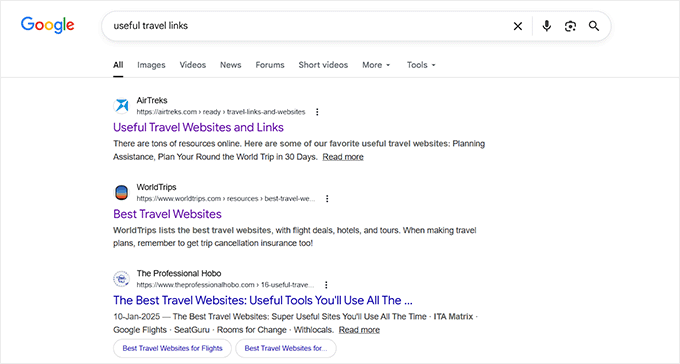
When you find one, don’t rush into pitching immediately.
I usually recommend scanning the page to see if it is still maintained and actually relevant to your topic. Some resource pages are outdated and rarely updated, so those are better to skip.
How to Pitch Your Content for a Resource Page
Once you’ve found a good resource page, your outreach should be simple and respectful of the fact that you are asking to be included in an existing list.
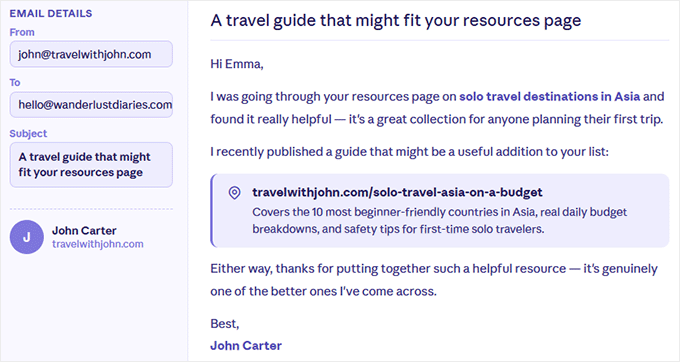
I suggest keeping your message focused on fit, not persuasion. Here’s an example you can use:
Hi [Name],
I was going through your resources page on [topic], and I found it really helpful. It’s a great collection for anyone looking to learn more about the subject.
I recently published a guide on [your topic], and I thought it might be a useful addition to your list.
Here’s the link:
[Your URL]
It covers [short explanation of what makes it useful], so I thought it could be relevant for your readers.
Either way, thanks for putting together such a helpful resource.
Best,
[Your Name]
This type of outreach works best when you sound natural and not overly “salesy.”
You’re simply suggesting something useful, not trying to force a backlink.
4. Create Linkable Assets (Earn Links Naturally)
One of the most reliable ways to earn backlinks over time is by creating content people naturally want to reference.
At WPBeginner, we do this with our free business tools, in-depth guides, and resources. These pages don’t depend heavily on outreach. They attract links because they solve real problems for users.
What Is a Linkable Asset?
When content genuinely solves a problem, backlinks tend to build up naturally over time, even without active outreach.
5 Types of Linkable Assets That Work Well
A linkable asset is any piece of content that is useful enough for other websites to reference in their own articles. It’s not created just for promotion or SEO. It’s built to be helpful, practical, or unique in some way.
Here are some formats that consistently perform well for WordPress sites:
| Type of Asset | What it is |
|---|---|
| In-depth guides | At WPBeginner, we create a lot of step-by-step tutorials that fully explain a topic from start to finish. These types of guides often become reference content for beginners. |
| Original data or insights | Research, surveys, or unique findings that other websites can cite in their content. |
| Free tools | Simple but useful tools like generators or calculators. These tools tend to attract steady backlinks because they are practical and time-saving. |
| Checklists | Easy-to-follow resources that help users complete a task without missing steps. |
| Templates | Ready-to-use formats like blog outlines, email templates, or planning sheets that people can quickly copy and adapt. |
How to Get Your Linkable Assets Noticed
Creating the content is only half the work. You also need to put it in front of the right people.
Here’s a simple process I recommend:
- Find Content That Already Performs Well in Your Niche: Look for articles that rank on Google or get shared often. These are strong signals that the topic already attracts links.
- Identify Who is Linking to That Content: Check which websites are referencing those articles. These are your best outreach targets because they are already comfortable linking to similar resources.
- Reach Out and Introduce Your Content Naturally: Keep your message simple. Show them your resource and briefly explain why it could be useful for their readers. The goal is to add value, not pressure them into linking.
This works especially well when your content clearly improves on what already exists. It could mean offering better structure, more up-to-date information, or a more practical and easy-to-follow format.
In many cases, even small improvements like clearer explanations or better examples can make a big difference in whether someone decides to link to your page.
5. Get Backlinks Using Connectively (HARO)
If you want backlinks from news sites, industry publications, or high-authority blogs, then Connectively can be a great strategy to try.
This method works differently from guest posting or outreach because journalists are already looking for expert quotes. Your job is simply to provide a useful response.
I’ve seen this work really well for building authority and earning natural editorial backlinks.
What Is Connectively?
Connectively is a platform where journalists request quotes and insights from experts. It’s run by Featured, the same company behind HARO (short for “Help a Reporter Out”), and gives you one place to find and respond to those requests.
For example, a writer working on an article about SEO, blogging, travel, or small business may ask questions like:
- “What is the biggest SEO mistake beginners make?”
- “Best travel apps for international trips?”
- “How do small businesses improve email marketing?”
If the journalist selects your response, they may quote you in their article and include a backlink to your website.
These are often some of the highest-quality backlinks you can get because they come from real editorial content.
Why This Strategy Works
Unlike cold outreach, Connectively works because journalists already need sources. You are responding to an existing request instead of convincing someone to link to you.
Keep in mind that competition can still be high.
Selection rates on these platforms tend to be low, because journalists often receive dozens or even hundreds of responses to a single query.
Most successful users report average response-to-link rates around 5–15%, depending on the industry and pitch quality.
The good news is that even a few successful placements can lead to very strong backlinks from trusted websites.
Frequently Asked Questions About Link Building
Here are quick answers to the most common questions people have about link building.
How many backlinks do I need for SEO?
There is no fixed number of backlinks you need. What matters more is quality and relevance. A few strong backlinks from trusted sites can often outperform hundreds of low-quality ones.
How long does link building take to show results?
Link building usually takes time to show results, often a few weeks to a few months. Search engines need time to discover new links and adjust rankings based on your site’s overall authority.
Are paid backlinks safe for SEO?
Paid backlinks are risky and can hurt your SEO if they are used to manipulate rankings. Google’s guidelines discourage buying links for ranking purposes.
In some cases, they may lead to penalties or reduced visibility. It’s always safer to focus on earning natural, editorial backlinks instead.
What is a nofollow backlink?
A nofollow backlink is a link that tells search engines not to pass SEO authority to the linked page. These links can still bring traffic and visibility, but they usually don’t directly improve rankings.
Can I do link building for free?
Yes, you can do link building for free using methods like guest posting, broken link building, resource page outreach, and internal linking. These strategies require time and effort instead of money.
How to check backlinks to my website?
You can check backlinks using tools like Google Search Console or Semrush. These tools show which websites are linking to your content and help you track your overall backlink profile.
Is a sponsored post the same as a paid backlink?
No, they are not the same, and the difference matters for SEO.
A sponsored post is paid advertising where your content or brand is featured on another website. Any links in these posts should use a “sponsored” or “nofollow” tag, which tells search engines not to pass SEO authority.
This is a safe and accepted practice when properly disclosed.
A paid backlink is when you pay for a regular “dofollow” link to be added just to improve rankings. This violates Google’s guidelines and can lead to penalties.
Does link building help you show up in AI search?
It does, but not as a separate tactic. Tools like Google’s AI Overviews, ChatGPT, and Perplexity tend to cite sources they consider trustworthy, and the authority you build through quality backlinks is a big part of earning that trust.
Google has confirmed there is no special optimization for AI Overviews. The same SEO fundamentals apply, and a page simply needs to be indexed and eligible to appear in search.
So the best way to get cited in AI search is the same as everything else in this guide: earn relevant, trustworthy links and publish clear, genuinely helpful content.
Final Thoughts on Link Building
For quick wins, start with internal linking and broken link building. These don’t depend on anyone else saying yes, so you can act on them today.
For lasting results, work on guest posting, building real relationships, and creating linkable assets. These take longer, but the links they earn tend to stick.
My advice is to pick one or two and stay consistent. Steady effort beats a big push that you drop after a week.
I hope this article helped you learn some link building strategies to grow your site. You may also want to see our expert insights on whether SEO still works and our list of the best AI SEO tools for WordPress.
If you liked this article, then please subscribe to our YouTube Channel for WordPress video tutorials. You can also find us on Twitter and Facebook.

Discussion
Have a question about this guide?
Share your question, issue, or improvement idea. Keep it specific so the reply can be useful for other WordPress users too.